
Features
Everything flows. Nothing falls through the cracks.
Commissioners build the league on the web. Captains manage their teams on mobile. Players see everything that matters. Every piece of data enters once and shows up everywhere it needs to.
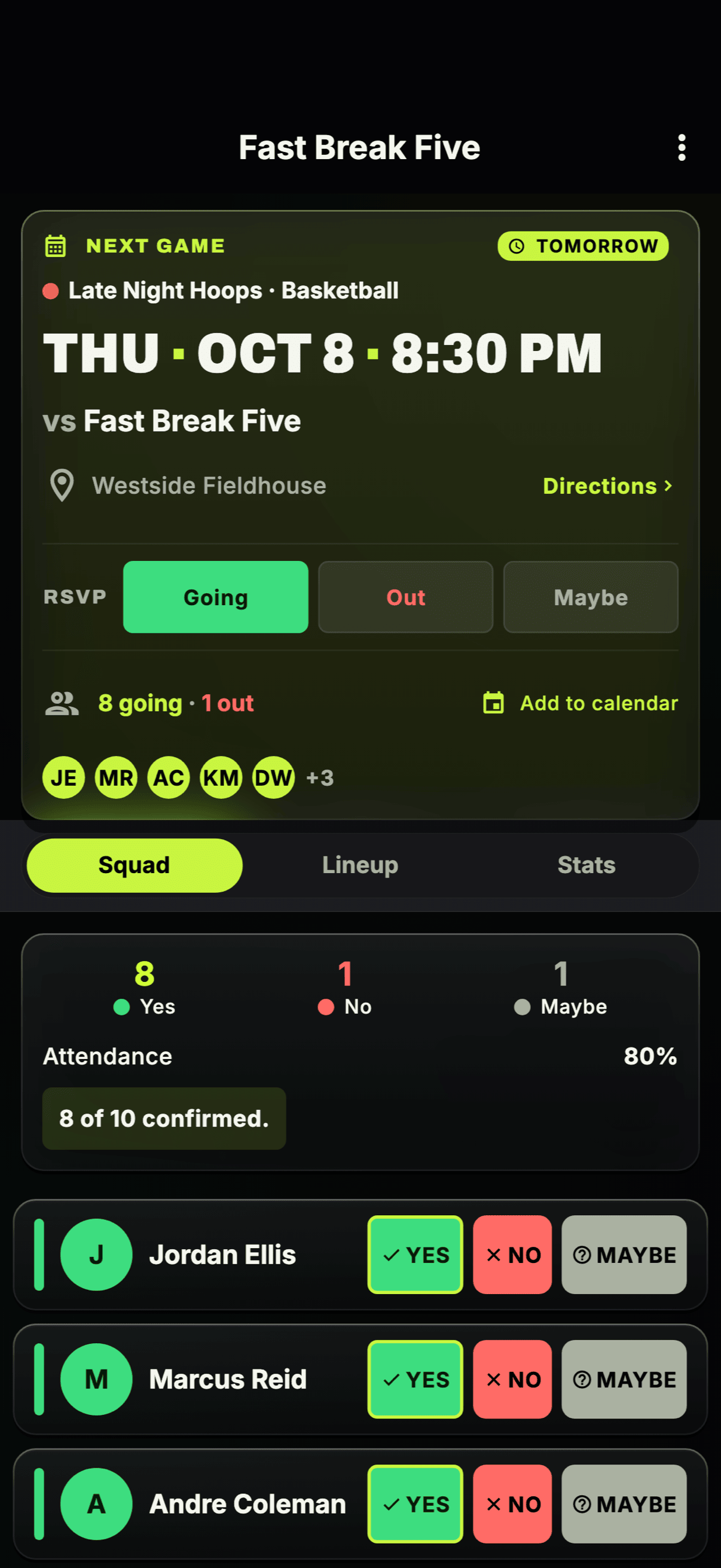
Know who’s showing up before game day
No more “who’s in?” group texts. Players RSVP from the mobile app or the web, captains see the headcount in real time, and everyone knows the plan before they leave the house.
How it connects
Captain creates a game and sends RSVPs
Players tap yes, no, or maybe from their phone or the web app
Captain sees live headcount and plans accordingly
- One-tap RSVP — yes, no, or maybe — on mobile or web
- Live headcount for every game, with subs tracked separately
- Reliability scores track who actually shows up
- Captains can nudge everyone who hasn’t replied
Snacks, scorekeeping, jerseys — assigned, reminded, done
Somebody always forgets it’s their snack week. Assign game duties — snacks, scorekeeping, jersey washing, or anything your team needs — to specific players for specific games, and Rosterlytic sends automatic reminders so nobody shows up empty-handed.
How it connects
Captain assigns duties to players on any game
Rosterlytic sends automatic reminders before game day
Players see their duty on the game card — no excuses left
- Assign duties per game — snacks, scorekeeping, jerseys, or custom duties
- Automatic reminders so assignments don’t get forgotten
- Duties show on the game card for the whole team to see
- Works alongside RSVPs — one screen for who’s coming and who’s bringing what
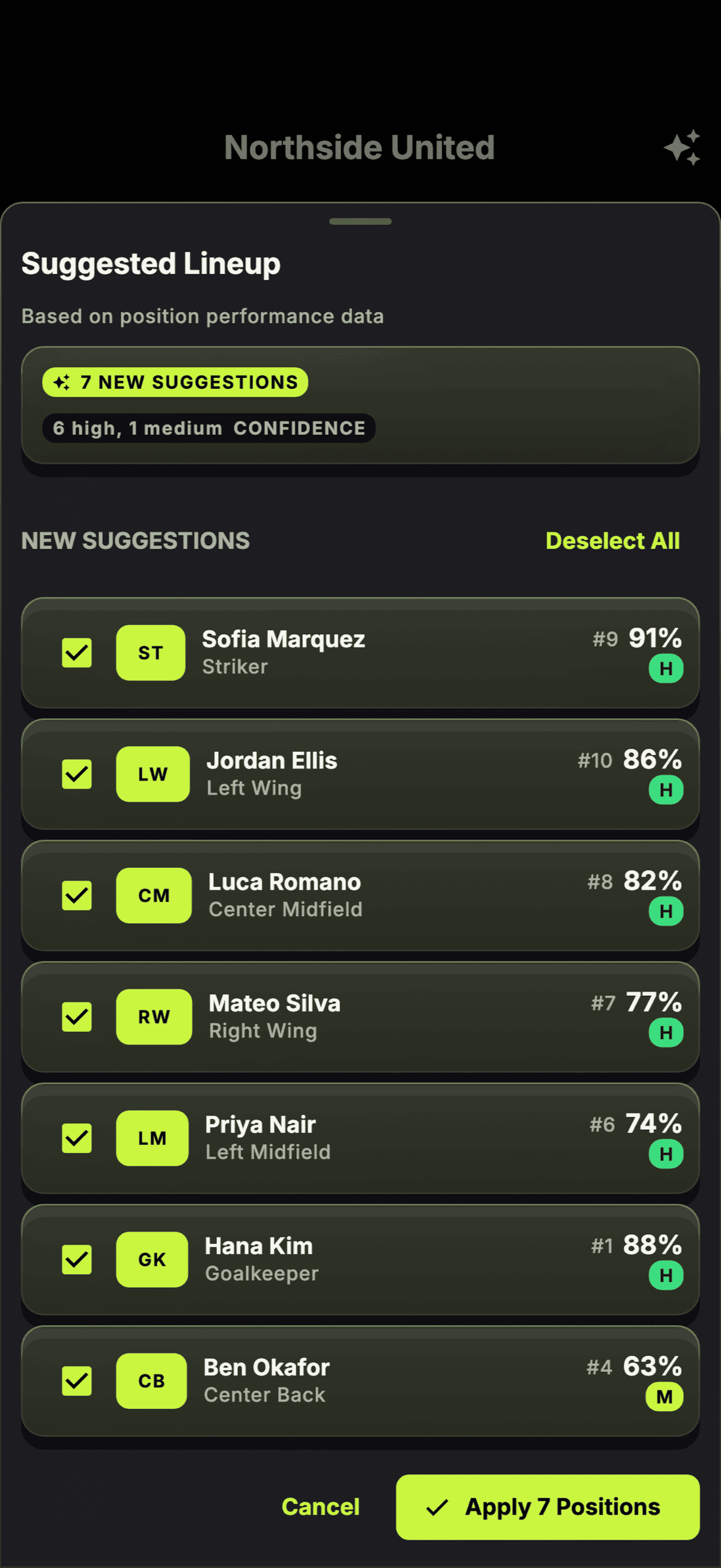
Set your lines. Balance your roster. Stop winging it.
Build lineups by position with sport-specific grids — hockey forward lines and D pairs, soccer formations, softball batting orders. Set default positions once and they pre-fill every lineup. Chemistry-powered suggestions help you find your strongest combinations.
How it connects
Captain sets default positions on the roster
Rosterlytic pre-fills lineups and suggests optimal placements based on performance + chemistry
Captain drags to adjust, then publishes to the team
- Sport-specific position grids (hockey lines, soccer formations, batting orders)
- Default positions pre-fill every lineup — set once, save time all season
- Chemistry-powered suggestions based on position performance and synergy data
- Drag-and-drop lineup builder on web, tap-to-assign on mobile
- Substitute players clearly labeled — roster, lineup, and stats all split regulars from subs
- Players see their assignment before game time
Mark players out — and keep their attendance record fair
Pulled hamstrings happen. Move a player to injured reserve and everyone knows they’re out — their status shows at a glance on the roster, and their attendance record stays fair while they heal: games missed on IR don’t count against their reliability.
How it connects
Captain, coach, or manager moves a player to injured reserve — backdated to the injury if needed
Everyone sees IR status at a glance on the roster and player stats screens
Captain activates the player when they’re back — history intact
- One tap to move a player to IR and back — with backdating for injuries that already happened
- IR status visible at a glance on the roster and player stats screens
- Attendance stays fair — games missed on IR don’t count as misses or drag reliability scores
- Full history preserved — and games played while on IR still count normally
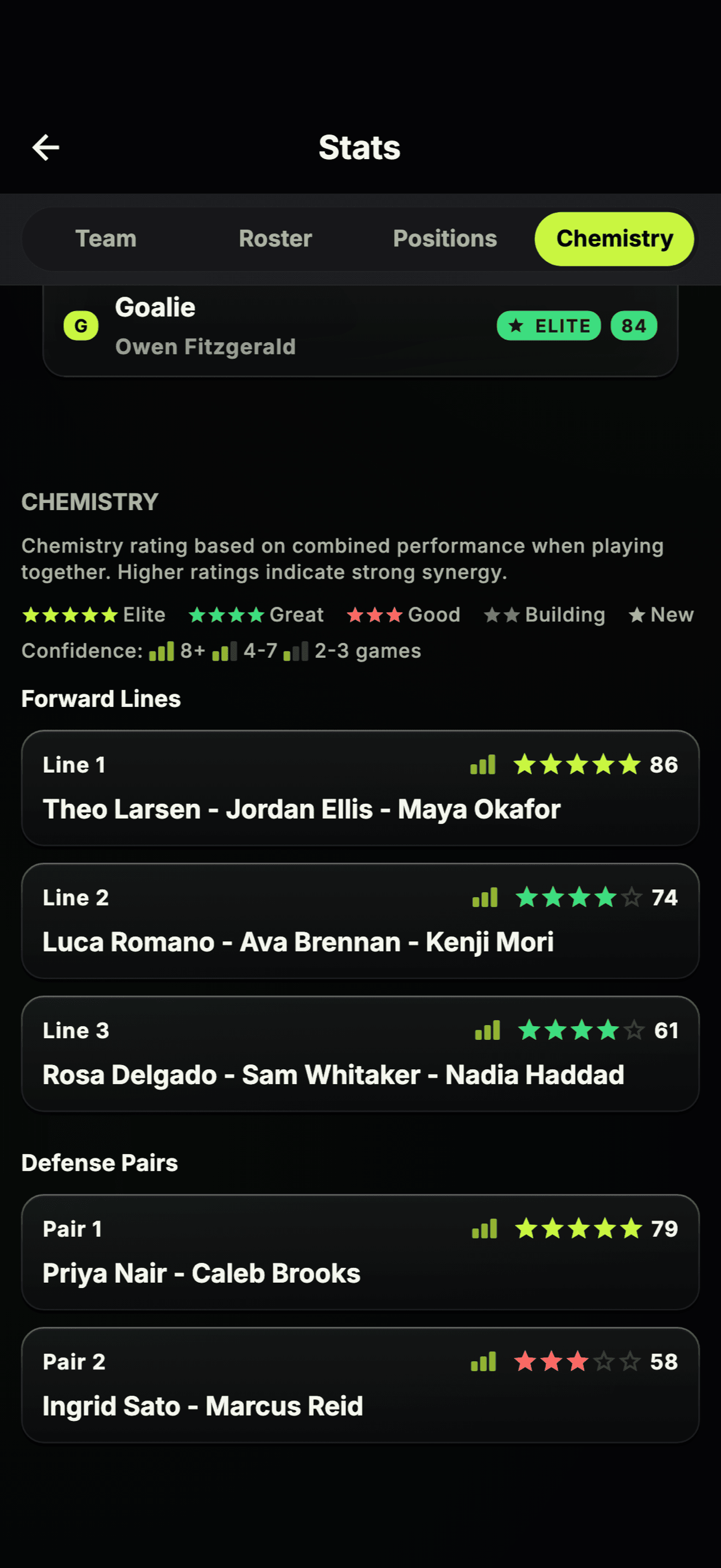
Your best combinations — backed by data
Line Chemistry is what makes Rosterlytic different. Live for all 9 sports — basketball, soccer, volleyball, flag football, and more — it tracks every player combination you’ve run and shows you which ones actually win. Synergy scores, performance differentials, and win rates for every unit.
How it connects
Captain records stats after each game
Rosterlytic calculates synergy scores across every player combo
Captain uses the data to build smarter lineups
- Synergy scores for every player combination
- Performance differentials per lineup unit
- Win rate by lineup configuration
- Live for all 9 sports
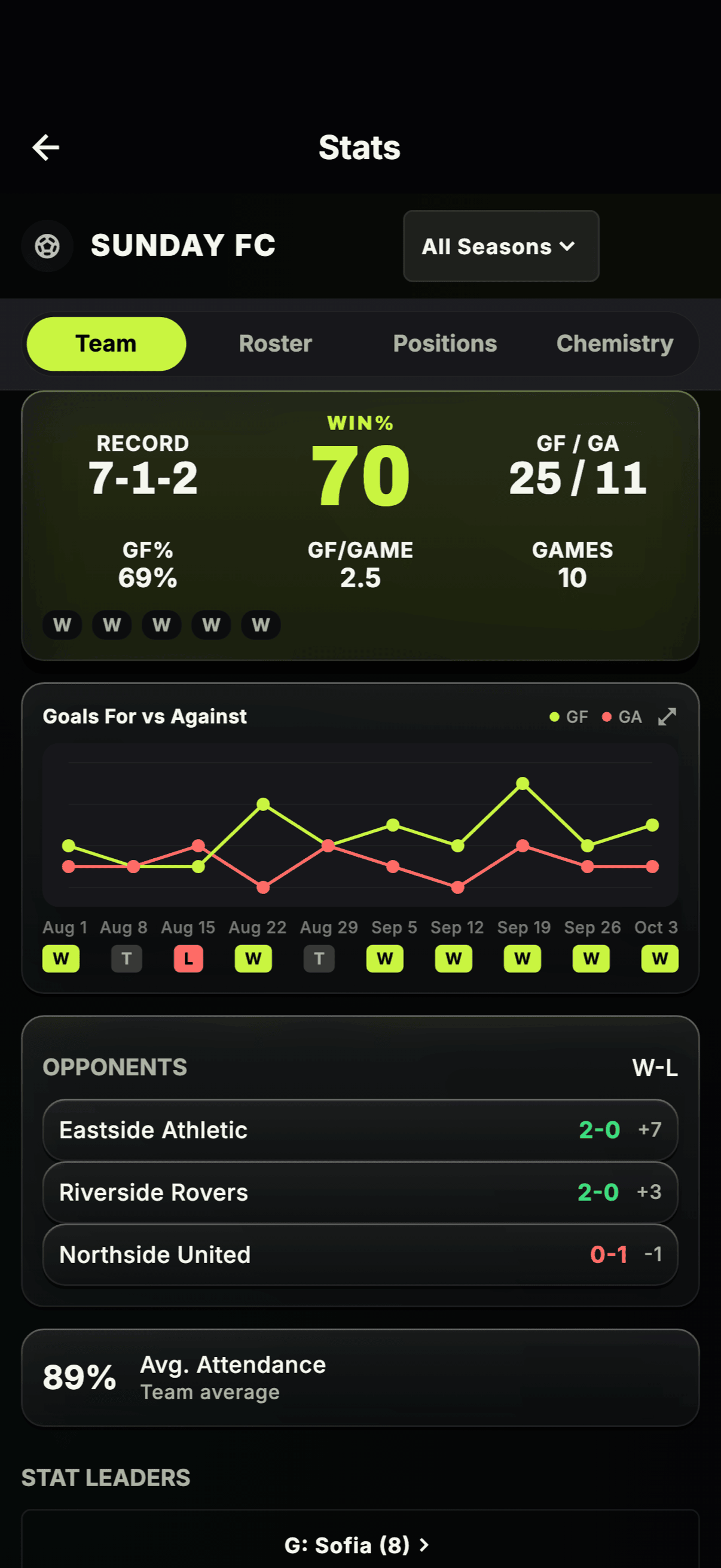
Every stat. Every player. Every game.
Three views of your season, all connected. Each player gets a personal hub with season summary, team ranking bars, win impact, and scoring efficiency. Captains get a sortable roster stats table to compare the whole team side-by-side. The team overview shows record, win percentage, a scoring sparkline you can tap to inspect, and opponent analysis. Sport-specific from top to bottom — including dedicated goalie stats for hockey and soccer.
How it connects
Captain enters player stats after the game
Players see their personal hub: season summary, team ranking, win impact
Captain compares the whole roster in the sortable stats table
- Player hub: season summary, team rankings, win impact %, and scoring efficiency
- Sortable roster stats table with leader highlighting and total vs per-game toggle
- Team overview: record, win %, scoring sparkline with tap-to-inspect, opponent analysis
- Goalie-specific stats: saves, goals against, save %, GAA, and W-L record
- Stats flow into Line Chemistry calculations automatically
Vote for and crown your MVPs
Every team argues about MVP at the end-of-season pizza night. Now you can settle it properly. Create season awards — MVP, most improved, best teammate, or anything you invent — open team-wide voting with a deadline, and crown the winners right in the app.
How it connects
Captain starts the season’s awards and opens voting with a deadline
Players vote for teammates from the season roster — and can change their vote until voting closes
Everyone sees the winners crowned when voting closes
- Season awards — MVP, Most Improved, and Rookie of the Season
- Voting happens right in the app — change your vote any time before the deadline
- Every player gets a vote — or captains can hand-pick a winner when that’s the team’s style
- Winners displayed for the whole team when voting closes
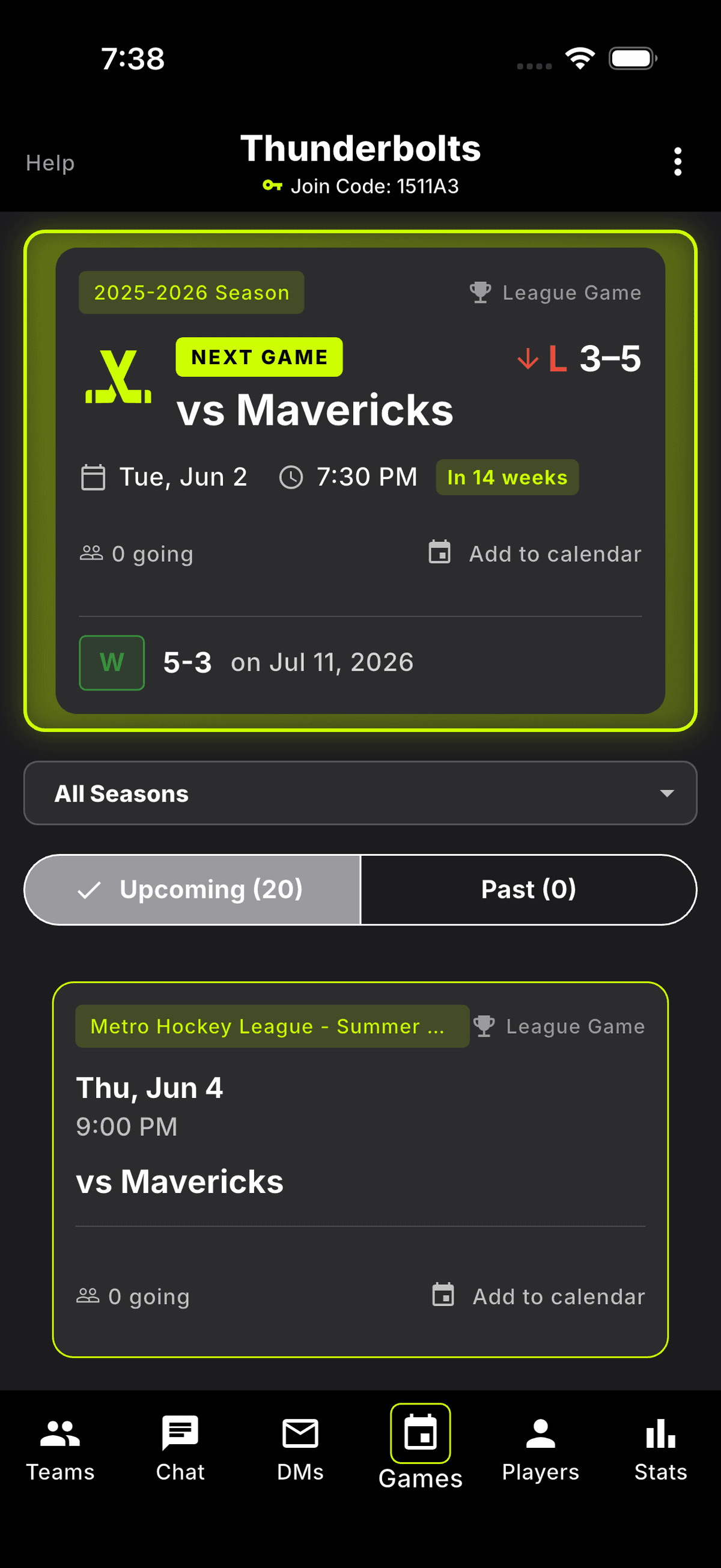
Your season, organized — from generation to game day
Commissioners generate full round-robin schedules in seconds. Every team in the league instantly sees their games, times, and opponents. No more emailing PDFs.
How it connects
Commissioner generates a round-robin schedule on the web
Every team sees their schedule in the mobile app instantly
Players get game reminders and can RSVP directly
- Round-robin schedule generation (1, 2, or 3 meetings per matchup)
- Games sync to every team’s schedule automatically
- Calendar integration for personal calendars
- Commissioners can adjust dates, times, and locations
Playoffs and scrimmages — because not every game counts the same
A Tuesday-night scrimmage shouldn’t tank your scoring title. Tag any game as a playoff or a scrimmage: playoff games are tracked as their own type and clearly marked, and scrimmages are excluded from season stats entirely — play loose, try new lines, and your season numbers stay honest.
How it connects
Captain tags a game as a playoff or scrimmage when creating it
Rosterlytic excludes scrimmage stats from season totals automatically
Everyone sees the game type on the schedule and game cards
- Tag games as playoff or scrimmage — labeled across the app
- Scrimmages excluded from season stats — experiment without consequences
- Playoff games clearly marked on the schedule and game cards
- RSVPs, duties, and chat work the same on every game type
Set your game length once — every calendar entry follows
Your league plays 60-minute games. Rosterlytic should know that. Set a default game length for your team and every game you add to your calendar gets a real end time automatically — no more entries that guess at when you’ll be done.
How it connects
Captain sets the default game length in team settings
Rosterlytic applies it to every game added to a personal calendar
Players see accurate start and end times on their calendars
- Set a default length once in team settings — captain-level control
- Calendar entries get real end times, not guesses
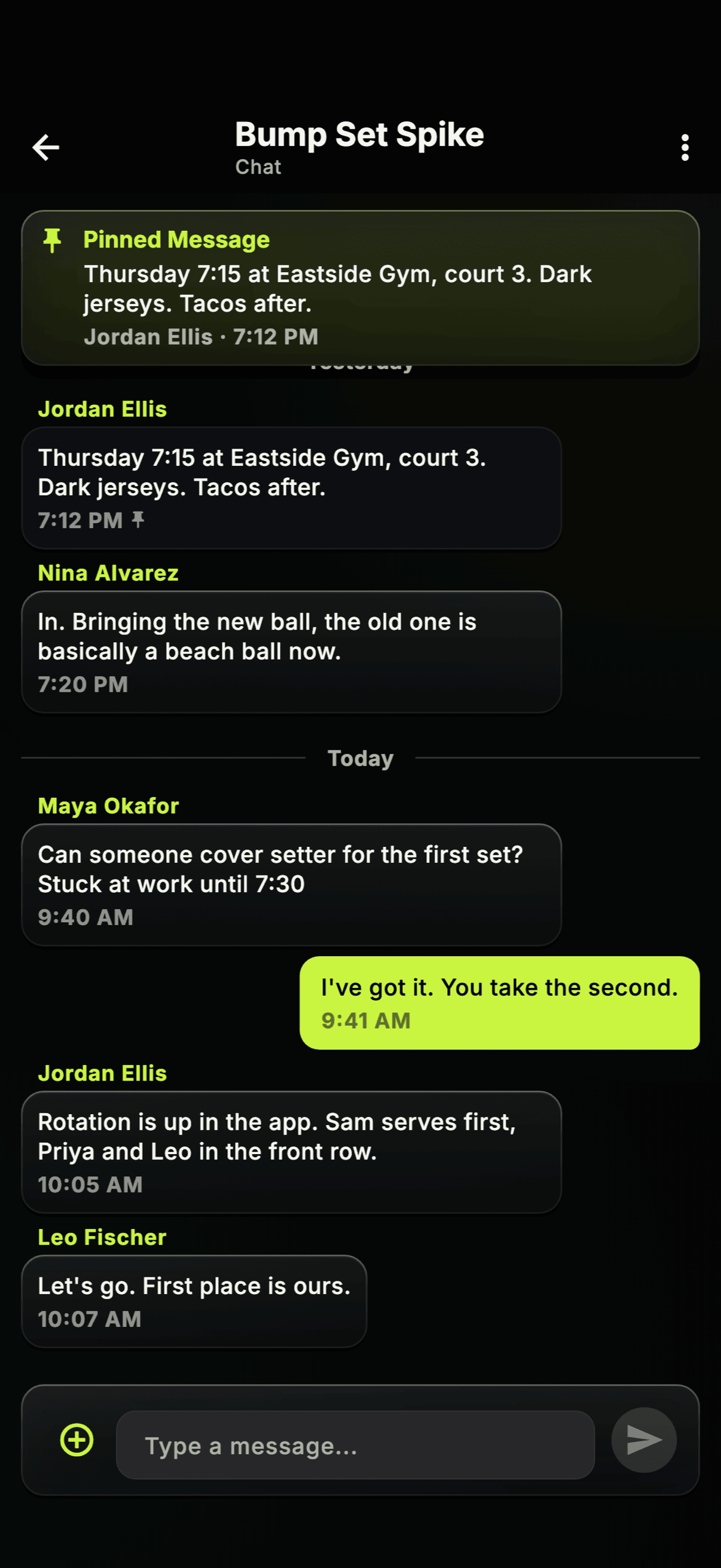
Communication that doesn’t get lost in the group chat
Keep team logistics in Rosterlytic and memes in the group chat. Two levels of communication — team chat for your squad, league chat for commissioner announcements — so the important stuff never gets buried.
How it connects
Captain posts an update, poll, or photo to team chat
Players get push notifications and can react or reply
Commissioner sends league-wide announcements or captain-only messages
- Team chat with photos, polls, and reactions
- Direct messages between any players
- League-wide announcements from commissioners
- Captain-only channel for commissioner–captain coordination
- Push notifications so nothing gets missed
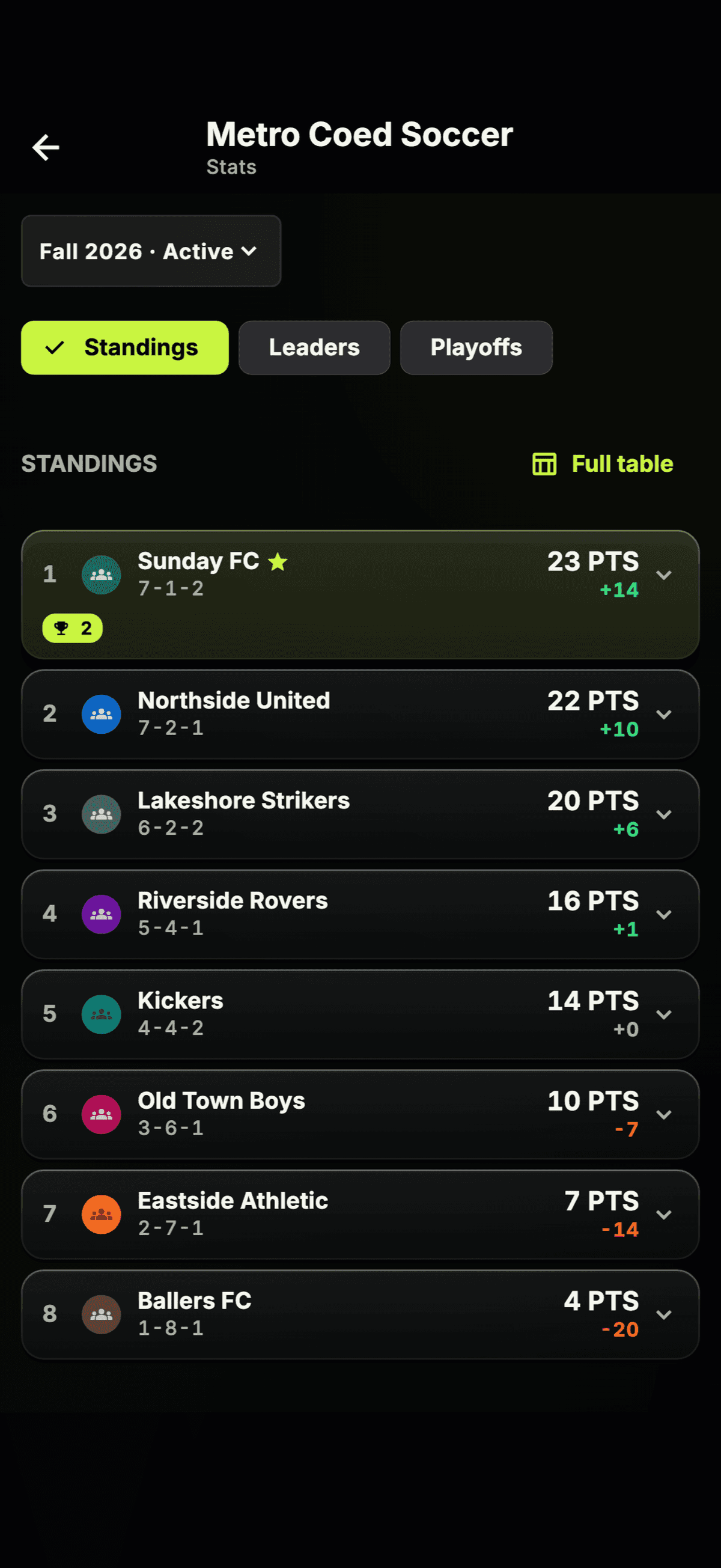
Commissioner tools that don’t require a spreadsheet degree
The full commissioner toolkit: schedule generation, live standings, stat tracking, and playoff brackets. Run your league from the web dashboard, and everything flows down to every team’s mobile app.
How it connects
Commissioner sets up the league, teams, and season on the web
Commissioner enters scores — standings and brackets update instantly
Every team sees standings, their record, and playoff seeding in real time
- Full web dashboard for commissioners at app.rosterlytic.com
- Auto-calculated standings with configurable point systems
- Playoff brackets — auto-seeded, series-based (best of 3, 5, or 7)
- Multi-season support with complete history
Run your whole sports complex from one app
For operators who run more than one team or league. Link every team and every league you run under one organization. See every player at your facility in a single roster view, filtered by team or league. Broadcast a single message to any combination of teams and leagues — push notifications hit every member. Share waivers, league rules, and schedule PDFs at the organization level once instead of per-team. One subscription cascades across everything you link.
How it connects
Operator creates an organization and links existing teams and leagues to it
Operator sees every player across every team in one view, filters by team or league
Operator composes one broadcast message and picks the teams + leagues it goes to
Members get push notifications and see shared files inside the apps they already use
- Link unlimited teams and leagues into one organization
- Org-wide player roster with team and league filters
- Broadcast one message to any combination of teams and leagues at once
- Push notifications fan out automatically through team and league chat
- Files & links at the org level — waivers, rules, schedule PDFs visible to every member
- Owner, admin, and coordinator roles with scoped permissions
- Premium cascades to every linked team and league — one subscription covers everything
Add coaches and managers — plus a privacy switch built for youth teams
Coach and Manager roles join Captain at the staff level — full edit rights to the roster, lineup, schedule, and stats. And when a team turns on Private Stats, individual stats, chemistry, and position grades go staff-only: coaches and managers see every player, but a player (or their guardian) sees only their own numbers — never a teammate’s. It’s built for youth teams, where stacking kids’ stats against each other invites trouble. Team scores and standings stay public.
How it connects
Captain or org admin assigns Coach and Manager roles from the team roster
Coach or Manager gets the same edit rights as a captain across the app
Captain turns on Private Stats in team settings
A player or guardian still sees their own stats and chemistry — just not teammates’
- Coach and Manager: captain-level edit rights to roster, lineup, schedule, and stats
- Role badges on every roster screen — mobile and web
- Private Stats sends individual stats, chemistry, and position grades staff-only
- Players and guardians still see their own numbers — just not other players’
- Team scores and standings stay public either way
- Server-enforced in the database — private stats can’t be pulled around, even via the API
Share waivers, rosters, and schedule PDFs without leaving the app
Every team, league, organization, and hockey group gets a Files & Links section. Staff attach PDFs, images, spreadsheets, and external URLs — roster PDFs, waivers, code-of-conduct docs, payment portals, Google Drive folders — from mobile or web. Members tap to open on either. No more “where did you send that waiver again?”
How it connects
Staff (captain, coach, manager, commissioner, owner, admin) uploads a PDF, image, spreadsheet, or external link — from mobile or web
Members tap to open on mobile or web — file opens in their default handler
Org admins attach files at the organization level (from the web) so every linked team can see them
- PDFs up to 25 MB — waivers, rosters, league rules, schedule docs
- Images (PNG, JPEG, WebP, HEIC) — jerseys, rink maps, certifications
- Spreadsheets (CSV, XLSX) and plain text
- External URLs — league schedule sites, payment portals, Google Drive folders
- Available on teams, leagues, organizations, and hockey groups
- Upload, add links, and delete — from mobile or web
Pickup, drop-in, clinics — finally a home for hockey crews that aren’t a team
If you run a Tuesday-night pickup or a Saturday-morning clinic, you’ve been improvising with group chats and spreadsheets. Hockey Groups is a parallel to our pickleball and tennis groups, built for how hockey actually works. Create a group, share the group’s join code, schedule typed events (games, practices, clinics, socials, or anything else), and track who’s in. Game events get full scoring with overtime and shootout result methods. Built-in group chat keeps the planning in one place.
How it connects
Owner creates a hockey group and shares the join code
Members join with the code and RSVP to events
Owner or Admin schedules typed events and records scores on games
- Typed events: games, practices, clinics, socials, or other
- RSVPs on every event — going, maybe, not going
- Full scoring on games — regulation, overtime, or shootout
- Built-in group chat to keep planning in one place
- Owner / admin / member roles with transferable ownership
- Optional seasons to group events together
- Files & Links attached to the group, same as teams and leagues
Register the kids you manage — then link them to teams with one tap
Parents asked, so we built it. Add the minors you’re responsible for to your own Rosterlytic account — no separate signups for each kid. When you join a team, a captain, coach, or manager generates a one-time claim link for any ghost player on the roster. Open the link, pick (or add) the child it belongs to, and the player is linked to your account from then on. Stats, history, jersey number — everything that existed before the link stays.
How it connects
Guardian adds the children they manage from account settings
Captain, coach, or manager generates a one-time claim link for a ghost player and texts or emails it to the parent
Guardian opens the link, picks the right child, and the player is linked
Guardian unlinks later if needed — the player’s history stays intact
- Add unlimited managed children under your own account
- Staff-issued claim links — one-time, and they expire after 7 days
- Player history preserved through link and unlink
- Phone number on your profile keeps staff reachable
- Anon preview on the claim link so parents see who they’re claiming before signing in
Track how the game was won — not just who won
Regulation win, overtime thriller, or shootout heartbreaker? Rosterlytic tracks it all. Commissioners enable overtime tracking per league and choose from sport-specific presets \u2014 NHL-style, IIHF-style, or Soccer PK \u2014 or set custom point values. Standings update automatically with OT and shootout columns, and every score across the app shows how it ended: (OT), (SO), (ET), or (PK). Tennis gets tiebreak detail too \u2014 “7-6(4)” instead of just “7-6”.
How it connects
Commissioner enables overtime tracking and picks a point system preset
Captain tags each game as regulation, overtime, or shootout when entering the score
Everyone sees OT/SO columns in standings and score labels on every surface
- Sport-specific presets: NHL Style, IIHF Style, Soccer PK — or fully custom point values
- OT win, OT loss, shootout win, shootout loss tracked separately in standings
- Score labels across schedule, dashboard, team detail, and public embeds
- Hockey: (OT) and (SO) — Soccer: (ET) and (PK) — sport-aware everywhere
- Tennis tiebreak detail — scores show "7-6(4)" with the loser’s tiebreak points
- Basketball, flag football, softball, kickball support optional (OT) tagging
Put your standings on your league’s website
Your league probably already has a website. Now you can embed live standings, scores, schedules, stat leaders, and full stats tables directly on it — no coding required. Copy the embed code, paste it into WordPress, Squarespace, Wix, or any site that supports iframes. Data updates automatically. Available on the League and Organization tiers.
How it connects
Commissioner enables public embeds from the league admin page
Commissioner copies the embed code and pastes it into their league website
Visitors see live standings, scores, and stats — always up to date
- Five embeddable widgets: standings, scores, schedule, stat leaders, and stats table
- Light, dark, and transparent themes with optional accent color
- Season dropdown — visitors can browse current and past seasons
- Player name format control — full name, first name + last initial, or first initial + last name
- Works on WordPress, Squarespace, Wix, or any site with iframe support
- Data refreshes automatically — no manual updates needed
Make it yours — logos, colors, and identity
Upload your team or league logo and set custom accent colors. Your branding shows up everywhere — standings, schedules, the hero card on your team dashboard, and even as the opponent logo when you play league games. Commissioners set league branding from the admin page; captains set team branding from team settings. Photos are moderated automatically to keep things clean.
How it connects
Commissioner uploads a league logo and picks primary/secondary colors from the admin page
Captain uploads a team logo and picks colors from team settings
Everyone sees branded standings, schedules, and opponent logos on game cards
- Upload any PNG, JPEG, or WebP logo — auto-resized and moderated
- Pick primary and secondary accent colors with live preview
- League branding colors the standings table, schedule, and web dashboard
- Team logos appear on the games screen, welcome screen, and hero card
- Opponent logos show on league game cards instead of generic sport icons
- Available on all tiers — free for every team and league
Two platforms. One ecosystem.
Commissioners manage the league from the web. Captains and players manage their teams on mobile. Everything stays in sync.